THE SHORT ANSWER
PII detection finds personal data, such as names, addresses, account numbers and identity numbers, in text, documents and images, and records where each value appears. Detection only flags values; it does not remove them. Detectors combine patterns, checksums, named-entity recognition and machine-learning models, and should be measured for recall and precision on documents with known planted values.
How this page was written. GritWorks makes GritRedact, GritTransform and GritRender, so we are not neutral. What we say about other products reflects their own public websites and documentation as of 21 November 2026. We make no claims about other products' accuracy. Products change: confirm details with each vendor.
What PII detection is, and what it is not
PII detection is the step that locates personally identifiable information and labels its type: a name here, a phone number there, a face in the corner of a scan. Its output is a list of findings, usually with a position, an entity type and a confidence score.
- PII flagging is not redaction. A finding says where a value is. Until the value is removed from the text layer, the page image and the metadata, the document still holds it. The PII redaction guide covers removal.
- Detection is not classification of a whole file. Knowing a file contains PII is useful for discovery; redaction and masking need every individual value.
- Detection is a policy decision as much as a model. Which entity types count, and whether business identifiers such as policy or claim numbers are included, must be agreed before anything is measured.
Checksums and validation: cutting false positives on identifiers
A pattern finds strings that look like an identifier. Validation checks whether they could be one, which removes most accidental matches without losing real values.
- Payment card numbers end in a Luhn check digit.
- IBANs carry two check digits verified with a mod 97 calculation.
- US bank routing numbers pass a weighted checksum (weights 3, 7 and 1).
- Aadhaar numbers end in a Verhoeff check digit; the Aadhaar masking guide explains it.
- US Social Security numbers have no check digit, only structural rules (for example, no 000 area or 0000 serial), so context words such as “SSN” matter more.
Use validation to rank or confirm findings, not to discard them silently: an OCR error in one digit makes a real number fail its checksum, and that number still needs handling.
Multilingual and OCR-text pitfalls
Detectors are usually built and tested on clean English text. Documents in production are neither.
- OCR errors change the value. A 0 read as O, a 1 read as l or a dropped digit breaks a pattern and a checksum. Test on degraded scans, not just digital PDFs; the Docling degraded-scan benchmark shows how much OCR output changes between clean and degraded copies of the same page.
- Layout breaks context. On forms, a label and its value sit in different boxes, and reading order can put them lines apart. Names in table cells carry no surrounding sentence for an NER model to use.
- Handwriting. Handwritten names and numbers are recognised less reliably than print; see handwriting OCR test data.
- Scripts and transliteration. Names in Devanagari, Bengali or Arabic script, mixed-script lines and transliterated names need detectors trained on them; see Hindi OCR test documents.
- PII outside the text. Faces, signatures, photos on identity documents and machine-readable zones need image detection, and values in metadata or QR codes never reach the OCR text at all.
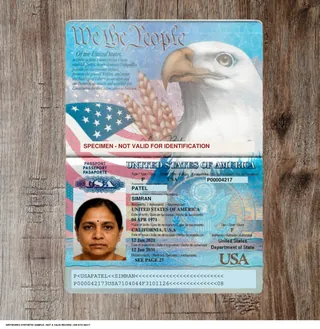
FREE SAMPLE PACK · US KYC
Try it with the free US KYC sample pack.
Fictional documents, clean and degraded, with the expected value and position of selected populated fields.
10 PDFs · Passport specimen, Driver’s license specimen, Passport card specimen and more · JSON and bounding boxes · CC BY 4.0
Free sample · No call required · No platform account
Need larger volumes, your own layouts or other formats? Talk to us ↗
How to measure PII detection with planted known values
You cannot score a detector without knowing every value that should have been found. Planting known values gives you that answer key.
- Build an answer key. Use documents whose every PII value and position is recorded: fictional documents generated with their values, such as the free KYC sample pack and the document verification test data, or approved real documents labelled by two reviewers. The packs are a testing resource, not a free tier.
- Include the hard cases on purpose. Clean and degraded copies of the same page, handwritten fields, values split across lines, other scripts and identifiers in tables.
- Decide what counts as a match. Exact span, overlapping span or correct entity type: write the rule down before scoring, and keep it fixed.
- Compute recall and precision per entity type and condition. Recall is found ÷ planted; precision is correct findings ÷ all findings. For redaction, a missed value (low recall) leaks data, while a false alarm (low precision) costs reviewer time and readability.
- Read the misses, not just the totals. Group missed values by cause (OCR error, layout, script, format) and fix the biggest group first.
- Re-run on every change. Keep the set versioned and re-score after each model, rule or OCR change.
The guide to evaluating redaction software extends this to sampling production output.
Where GritWorks fits
- GritRedact detects PII and PHI with a local model, lets a reviewer correct detections and approve permanent removal, and exports an audit record. Install Docker in your environment for fully offline processing, or use the sales-assisted SaaS.
- GritTransform can flag potentially sensitive values in the fields it extracts. Those flags help you spot data that needs attention; they do not remove it from the source.
- The free document dataset packs give you fictional documents with recorded values to build a first answer key.
What GritWorks does not replace
- GritWorks complements authorization, governance and e-discovery tools rather than replacing them. Access control, data catalogues, retention policy and legal review platforms keep their jobs; GritWorks prepares the documents, images and audio that move between them.
- Redaction is not authorization. If a person or system is not entitled to a record, block access instead of sending a redacted copy.
- Automated redaction alone is not a declaration of HIPAA de-identification. HIPAA recognizes the Safe Harbor and Expert Determination methods; policies, validation and human review must match the intended use and recipient.
- PII flagging is not redaction. GritTransform can flag potentially sensitive values in extracted results, but that does not remove them from the source. Use GritRedact when content must be removed.
- Engagement is sales-assisted. GritWorks has no public or self-serve API, SDK, MCP server or free tier, and publishes no price list: pricing is agreed with sales. Customer APIs are provided after onboarding.
Common questions
What is PII detection?
PII detection locates personally identifiable information, such as names, addresses, phone, account and identity numbers, faces and signatures, in text, documents and images, and labels each finding with its type and position.
Is PII detection the same as PII redaction?
No. Detection only flags where personal data is. Redaction removes it from the text layer, page image and metadata so it cannot be recovered. A document with flagged PII still contains that PII.
What methods do PII detectors use?
Pattern rules and dictionaries for fixed formats, checksums to validate identifiers, named-entity recognition for names, addresses and organisations, and machine-learning or language models for context-dependent cases. Most detectors combine several.
How do checksums help PII detection?
Many identifiers carry a check digit, such as Luhn for payment cards, mod 97 for IBANs and Verhoeff for Aadhaar. Validating a match against it removes accidental matches. An OCR error can break the checksum of a real number, so use it to rank findings, not to discard them.
How do I measure PII detection recall and precision?
Score the detector on documents whose PII values are all known, for example fictional documents generated with recorded values. Recall is planted values found divided by all planted values; precision is correct findings divided by all findings. Report both per entity type and document condition.
Why does PII detection miss values in scanned documents?
OCR errors change digits and letters, form layouts separate labels from values, handwriting and non-Latin scripts are recognised less reliably, and some PII, such as faces, signatures and QR data, never appears in the OCR text.
FREE SAMPLE PACK · US KYC
Try it with the free US KYC sample pack.
Fictional documents, clean and degraded, with the expected value and position of selected populated fields.
10 PDFs · Passport specimen, Driver’s license specimen, Passport card specimen and more · JSON and bounding boxes · CC BY 4.0
Free sample · No call required · No platform account
Need larger volumes, your own layouts or other formats? Talk to us ↗