What redaction means
To redact is to remove information from a record before others see it. A redacted document is the shared version, usually with black boxes or labels such as [REDACTED] where content was. Redaction began with legal disclosures, government records and court filings, and is now routine wherever documents leave the team that owns them: sharing files with vendors, answering access requests, preparing data for AI and analytics, and building test sets.
What gets redacted depends on the purpose: personal data (PII), health information (PHI), account and card numbers, trade secrets or privileged legal content. Related techniques differ in what they leave behind:
- Masking replaces values with substitutes instead of removing them; see data masking vs tokenization.
- Anonymisation is an outcome, not a technique: nobody can be identified from what remains; see the digitally anonymised guide.
- PII flagging only marks values; it removes nothing.
True removal vs drawn boxes
Most public redaction failures are not missed detections. The content was covered, not removed. A digital document has several places a value can survive:
- The text layer. Characters under a drawn box can still be selected, copied, searched and extracted.
- The page image. On a scan, the value is pixels. Deleting OCR text leaves the image readable; the pixels must be overwritten.
- Hidden OCR text. Searchable scans carry an invisible text layer that repeats what the image shows.
- Metadata. Author, title, subject and keyword fields, image EXIF data and file names.
- Revisions. PDFs saved incrementally can keep earlier versions of the page inside the file.
- Other objects. Comments, form fields, bookmarks, attachments and layers.
True removal deletes the characters, overwrites the pixels, cleans the metadata and writes a new file without the old revisions. In a PDF editor, marking an area for redaction does nothing until the redactions are applied and the file is saved.
How to verify redaction: re-extract the output
Do not judge redaction by looking at the page. Check the output file the way a determined recipient would:
- Extract all text from the redacted file and search it for every value that should be gone.
- Run OCR on the output pages to confirm the pixels no longer show the values.
- Inspect metadata, comments, attachments and revisions.
- Sample at volume. For automatic redaction, review a random sample of output and count misses per entity type.
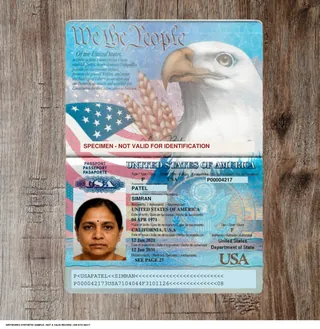
This works best on test documents whose sensitive values you already know, so you can search for each one and count what was missed. The free US KYC sample pack contains fictional identity documents for that purpose; it is a testing resource, not a free tier. The redaction software evaluation guide turns this into a vendor-neutral checklist.
FREE SAMPLE PACK · US KYC
Try it with the free US KYC sample pack.
Fictional documents, clean and degraded, with the expected value and position of selected populated fields.
10 PDFs · Passport specimen, Driver’s license specimen, Passport card specimen and more · JSON and bounding boxes · CC BY 4.0
Free sample · No call required · No platform account
Need larger volumes, your own layouts or other formats? Talk to us ↗
AI redaction, automatic redaction software and OCR redaction
Automatic redaction software combines several detectors: pattern rules and checksums for structured numbers, named-entity recognition and other machine-learning models for names, addresses and context-dependent items, vision models for faces and signatures, and speech models for audio. OCR redaction adds a recognition step so values on scanned pages can be found and the matching pixels removed. AI redaction usually means the model-based parts.
- Detection is never perfect. Measure misses and over-redaction on your own documents instead of relying on a published figure.
- OCR quality sets the ceiling. A value the OCR misreads is a value the detector cannot find: handwriting, stamps, skewed or faint scans and other scripts need testing.
- Keep a human in the loop. Review detections before permanent removal, especially for high-stakes disclosures, and record who approved what.
- Mind where it runs. Sending documents to an external API for redaction is itself a disclosure; on-premises processing keeps them inside your environment.
GritRedact detects PII, PHI and custom entities in documents, images and audio, keeps human review before permanent removal, and exports an audit record. Install Docker in your environment and it runs fully offline with no network egress, or use it as sales-assisted SaaS.
Redaction is not authorization
Redaction controls what a shared copy contains. It does not decide whether the recipient should receive the record at all. If a person or system is not entitled to it, block access instead of sending a redacted copy. Redaction alone is not HIPAA de-identification either; see the 18 HIPAA identifiers guide.
Keep the original under your retention policy, keep a record of what was removed and why, and watch for over-redaction, which can make a disclosure useless or incomplete. This page is an educational summary, not legal advice.
What GritWorks does not replace
- GritWorks complements authorization, governance and e-discovery tools rather than replacing them. Access control, data catalogues, retention policy and legal review platforms keep their jobs; GritWorks prepares the documents, images and audio that move between them.
- Redaction is not authorization. If a person or system is not entitled to a record, block access instead of sending a redacted copy.
- Automated redaction alone is not a declaration of HIPAA de-identification. HIPAA recognizes the Safe Harbor and Expert Determination methods; policies, validation and human review must match the intended use and recipient.
- PII flagging is not redaction. GritTransform can flag potentially sensitive values in extracted results, but that does not remove them from the source. Use GritRedact when content must be removed.
- Engagement is sales-assisted. GritWorks has no public or self-serve API, SDK, MCP server or free tier, and publishes no price list: pricing is agreed with sales. Customer APIs are provided after onboarding.
Common questions
What is redaction?
Redaction is the permanent removal of sensitive information, such as names, account numbers, faces or privileged text, from a document, image or recording before it is shared, so the recipient cannot see or recover it.
What does redacted mean?
Redacted means content has been removed from the version of a record that is shared, usually shown as black boxes or a label such as [REDACTED]. Properly redacted content cannot be recovered from that file.
What is AI redaction?
AI redaction uses machine-learning models, such as entity recognition, vision and speech models, to find sensitive values that fixed rules miss, like names in free text, faces and spoken numbers. It still needs measurement on your own documents and human review before permanent removal.
What is OCR redaction?
OCR redaction reads scanned pages with optical character recognition so sensitive values can be detected, then removes the matching pixels from the page image and the text from any OCR layer. Values the OCR misreads can be missed, so scans need testing.
Is a black box over text redaction?
Not on its own. A box drawn over text in a PDF or image editor is an annotation; the text, pixels and metadata underneath stay in the file. Redaction is complete only when that content is removed and the file is saved without earlier revisions.
How do you check that redaction worked?
Extract all text from the output and search for the values that should be gone, run OCR on the output pages, inspect metadata, comments and revisions, and sample automatic output. Test documents with known values make the check measurable.
Does redaction make a document safe to share with anyone?
No. Redaction is not authorization: if a recipient is not entitled to a record, block access instead of sending a redacted copy. Redaction alone is also not HIPAA de-identification.
FREE SAMPLE PACK · US KYC
Try it with the free US KYC sample pack.
Fictional documents, clean and degraded, with the expected value and position of selected populated fields.
10 PDFs · Passport specimen, Driver’s license specimen, Passport card specimen and more · JSON and bounding boxes · CC BY 4.0
Free sample · No call required · No platform account
Need larger volumes, your own layouts or other formats? Talk to us ↗